Support

As evidenced by over 30 years of development history, trust-worthy Korean CAD, CADian!

Utility Archive · 2026.03.02
[Lisp #401] ECEN/EHID/EPHA/EDIM/ETEXT/ECIRCLE/DELARC/EHATCH : Selective Object Deletion by Type

Hi,

This is CADian.

We have prepared 400+ Lisp programs to aid your CAD experience, free of charge!

Full List of all CADian Lisps : [Full CADian Lisp List]

How to Install : [CADian Lisps Download & Install Guide]


====================================================


1/ Command :

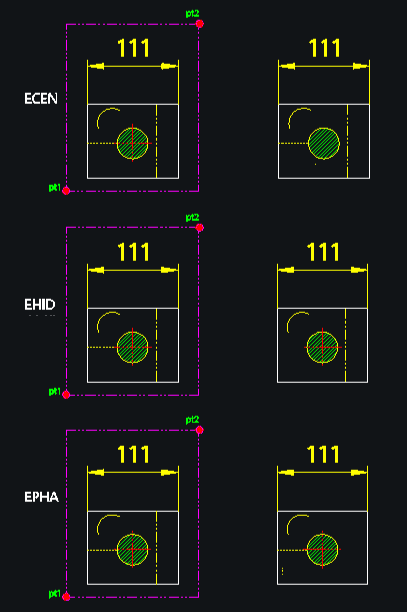
  • ECEN : Center Lines

  • EHID : Hidden Lines

  • EPHA : Phantom Lines

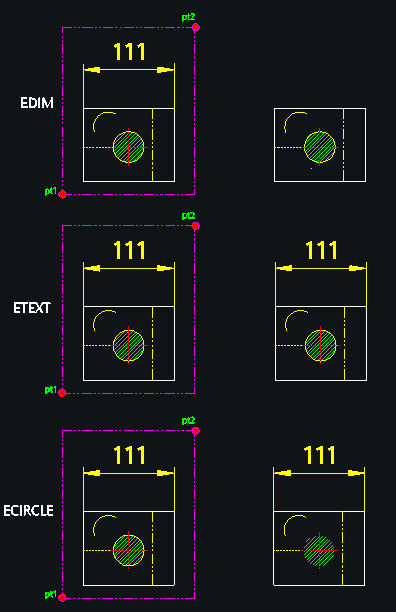
  • EDIM : Dimensions

  • ETEXT : Text

  • ECIRCLE : Circles

  • DELARC : Arcs

  • EHATCH : Hatches


2/ Description :
This set of tools allows you to quickly delete specific types of objects within a selected area, filtering them by their properties (layer or object type).

  • Targeted Deletion: Instead of manually selecting objects, you can run a specific command to remove only center lines, hidden lines, dimensions, text, circles, arcs, or hatches.

  • Arc Filter: The DELARC command specifically allows you to delete all arcs or only arcs of a specific diameter.


3/ How to Use:

  1. Type the desired command (e.g., ECEN to delete center lines) and press Enter.

  2. Select the Area (using a window or crossing selection) containing the objects.

  3. The specific objects matching the command type will be deleted immediately.

    • Note for DELARC: After selecting objects, you can press Enter to delete all arcs, or type a diameter value (e.g., 10) to delete only arcs of that specific size.


Added to cart.

VIEW CART

Please sign in first.

JOIN