Support

As evidenced by over 30 years of development history, trust-worthy Korean CAD, CADian!

Utility Archive · 2026.03.02
[Lisp #354] SDA : Automated Shaft Dimensioning

Hi,

This is CADian.

We have prepared 400+ Lisp programs to aid your CAD experience, free of charge!

Full List of all CADian Lisps : [Full CADian Lisp List]

How to Install : [CADian Lisps Download & Install Guide]


====================================================


1/ Command :

  • SDA


2/ Description :
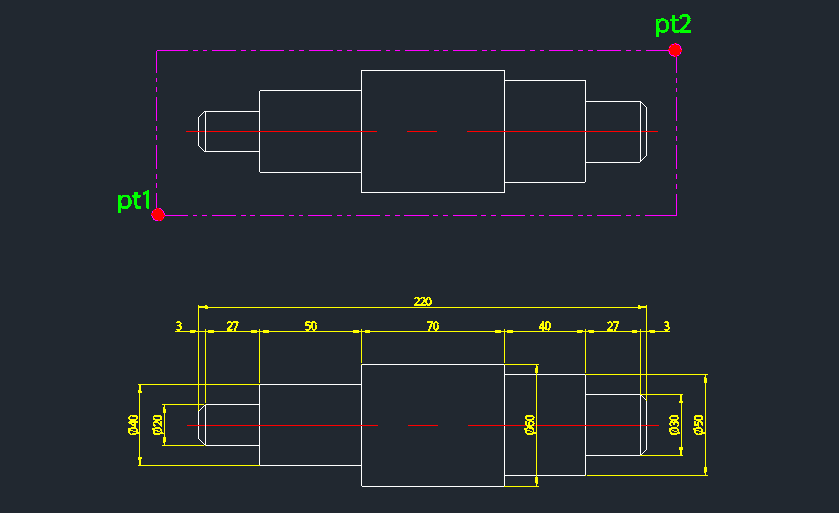
This tool completely automates the dimensioning of shafts, including the insertion of diameter symbols (Ø).

  • Two-Step Dimensioning: First places the vertical dimension for the diameter, then the horizontal dimension for the length.

  • Auto-Symbol: Automatically adds the diameter symbol (Ø) to the vertical dimension text.

  • Precision Control: Allows user to set decimal precision for the diameter dimension.

  • Smart Spacing: Dimension line spacing is automatically adjusted based on DIMTXT (text size) and DIMSCALE variables.

  • Input: Requires selecting two points to define the feature, and then specifying the decimal precision.


3/ How to Use :

  1. Type sda in the command line and press Enter.

  2. Click the First Point (PT1) of the shaft feature.

  3. Click the Second Point (PT2).

  4. Press Enter to place the vertical dimension.

  5. Enter the number of Decimal Places (integer) for the vertical dimension and press Enter.

  6. The tool automatically adds the Ø symbol to the vertical dimension and creates the corresponding horizontal dimension at the top.


Added to cart.

VIEW CART

Please sign in first.

JOIN