Support

As evidenced by over 30 years of development history, trust-worthy Korean CAD, CADian!

Utility Archive · 2026.03.02
[Lisp #353] CDM : Adjust Circle Distance (Horizontal/Vertical)

Hi,

This is CADian.

We have prepared 400+ Lisp programs to aid your CAD experience, free of charge!

Full List of all CADian Lisps : [Full CADian Lisp List]

How to Install : [CADian Lisps Download & Install Guide]


====================================================


1/ Command :

  • CDM


2/ Description :
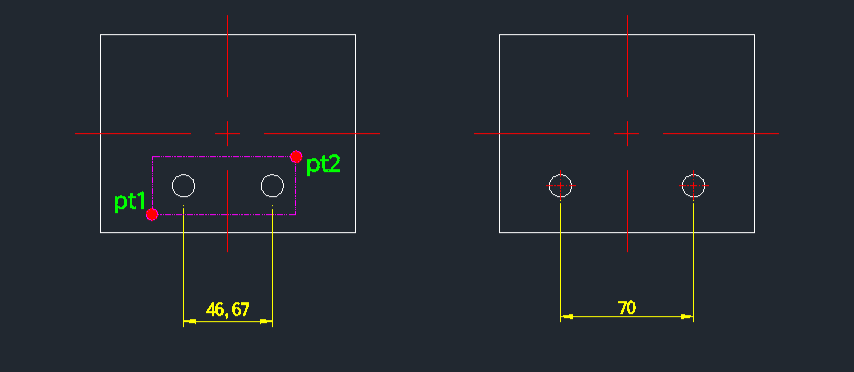
This tool adjusts the distance between two selected circles to a user-specified value, moving them horizontally or vertically as needed.

  • Precise Spacing: Easily sets the exact distance (center-to-center) between two circles.

  • Symmetrical Movement: Moves both circles equally from their collective center point to achieve the target distance.

  • Automatic Centerlines: Automatically draws centerlines for the moved circles.

  • Auto-Orientation: Detects whether the circles are aligned horizontally or vertically and adjusts the movement direction accordingly.

  • Input: Requires selecting two circles and entering the desired distance.


3/ How to Use :

  1. Type cdm in the command line and press Enter.

  2. Click the First Circle (PT1).

  3. Click the Second Circle (PT2).

  4. The current distance is displayed in the command line.

  5. Enter the New Distance value (e.g., 70) and press Enter.

  6. The circles move apart (or closer) to match the new distance, and centerlines are drawn.


Added to cart.

VIEW CART

Please sign in first.

JOIN