Support

As evidenced by over 30 years of development history, trust-worthy Korean CAD, CADian!

Utility Archive · 2026.03.02
[Lisp #341] MINT : Move Object to Intersection Point

Hi,

This is CADian.

We have prepared 400+ Lisp programs to aid your CAD experience, free of charge!

Full List of all CADian Lisps : [Full CADian Lisp List]

How to Install : [CADian Lisps Download & Install Guide]


====================================================


1/ Command :

  • MINT


2/ Description :
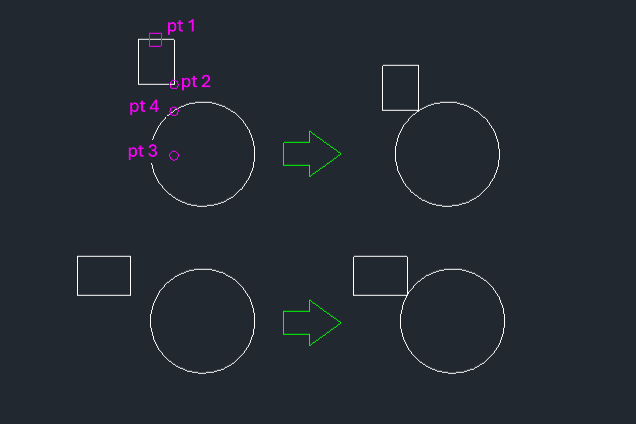
This tool facilitates moving a selected object to a precise intersection point created by temporary geometry.

  • Complex Positioning: Useful when you need to move an object to a location defined by the intersection of existing geometry and a temporary projection or line.

  • Temporary Construction: It creates a temporary line from a reference point to define an intersection, moves the object, and then automatically deletes the temporary line.

  • Input: Requires selecting the object to move, a base point on the object, a second point to define a temporary line (creating an intersection with another object), and finally the intersection point itself as the destination.


3/ How to Use :

  1. Type mint in the command line and press Enter.

  2. Select the Object to move.

  3. Click the Base Point (2) on the object.

  4. Click a Second Point (3) to draw a temporary line that intersects with another existing object (e.g., a circle).

  5. Click the Intersection Point (4) created by the temporary line and the existing object.

  6. The object is moved to that intersection point, and the temporary line is removed.


Added to cart.

VIEW CART

Please sign in first.

JOIN