Support

As evidenced by over 30 years of development history, trust-worthy Korean CAD, CADian!

Utility Archive · 2026.03.02
[Lisp #336] 6LEA : Draw Split Hex Leader

Hi,

This is CADian.

We have prepared 400+ Lisp programs to aid your CAD experience, free of charge!

Full List of all CADian Lisps : [Full CADian Lisp List]

How to Install : [CADian Lisps Download & Install Guide]


====================================================


1/ Command :

  • 6LEA


2/ Description :
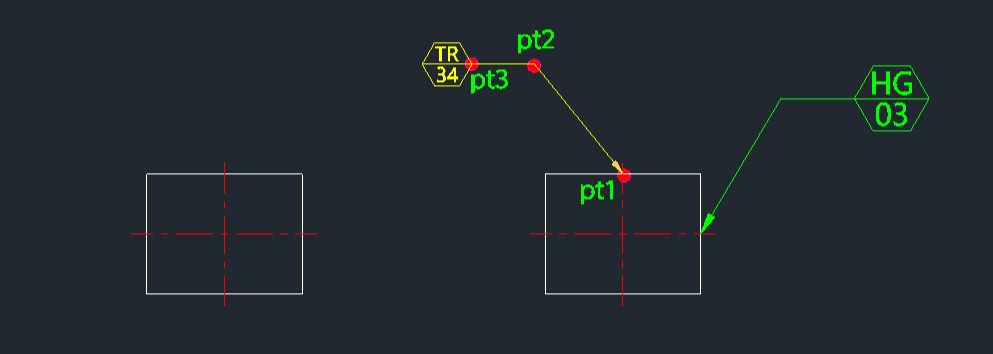
This tool draws a leader line that terminates in a hexagon symbol containing two lines of text.

  • Symbol Creation: Automates the creation of a hexagonal leader annotation often used for revision clouds, part numbers, or specific engineering notes.

  • Two-Line Text: Allows inputting two separate lines of text (upper and lower) within the hexagon.

  • Dynamic Scaling: The size of the arrow, text, and hexagon is controlled by the DIMSCALE and DIMTXT variables. Changing these settings will resize the entire annotation.

  • Input: Requires three points (leader start, knee, end/symbol location) and the text content for the top and bottom lines.


3/ How to Use :

  1. Type 6lea in the command line and press Enter.

  2. Click the Leader Start Point (PT1).

  3. Click the Leader Knee Point (PT2).

  4. Click the Symbol Location Point (PT3).

  5. Type the Upper Text content and press Enter.

  6. Type the Lower Text content and press Enter.

  7. The leader with the hexagonal symbol and text is drawn.


Added to cart.

VIEW CART

Please sign in first.

JOIN