Support

As evidenced by over 30 years of development history, trust-worthy Korean CAD, CADian!

Utility Archive · 2026.03.02
[Lisp #333] GCOLOR / GLAYER : Select Similar Objects by Color / Layer

Hi,

This is CADian.

We have prepared 400+ Lisp programs to aid your CAD experience, free of charge!

Full List of all CADian Lisps : [Full CADian Lisp List]

How to Install : [CADian Lisps Download & Install Guide]


====================================================


1/ Command :

  • GCOLOR : Select Similar Objects by Color

  • GLAYER : Select Similar Objects by Layer


2/ Description :
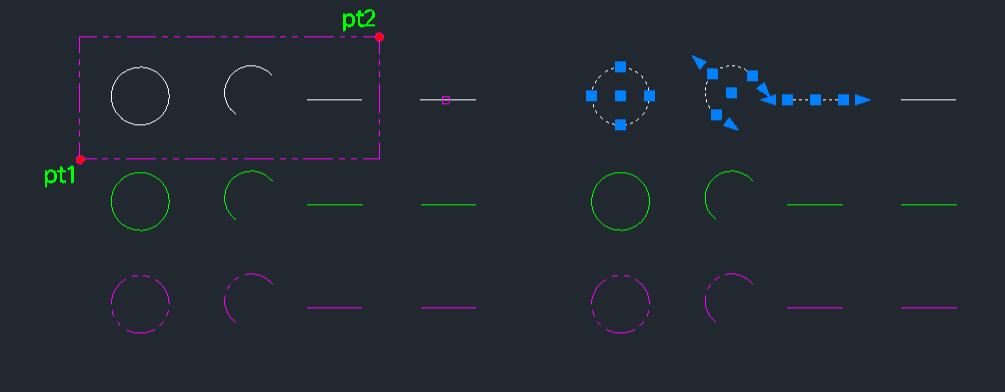
This tool allows you to select all objects within a specified area that share the same color or layer as a reference object.

  • GCOLOR: Selects objects with the same color as the source object (blocks are excluded).

  • GLAYER: Selects objects on the same layer as the source object (blocks are excluded).

  • Selection Method: Works by picking a source object to define the property (color or layer) and then defining a window area to search.


3/ How to Use :

  1. To select by Color:

    • Type gcolor in the command line and press Enter.

    • Click the Source Object whose color you want to match.

    • Click PT1 and PT2 to define the selection window.

    • All matching colored objects in that area are selected.

  2. To select by Layer:

    • Type glayer in the command line and press Enter.

    • Click the Source Object whose layer you want to match.

    • Click PT1 and PT2 to define the selection window.

    • All matching layered objects in that area are selected.


Added to cart.

VIEW CART

Please sign in first.

JOIN