Support

As evidenced by over 30 years of development history, trust-worthy Korean CAD, CADian!

Utility Archive · 2026.03.02
[Lisp #322] AUTOBK : Batch Replace Title Blocks

Hi,

This is CADian.

We have prepared 400+ Lisp programs to aid your CAD experience, free of charge!

Full List of all CADian Lisps : [Full CADian Lisp List]

How to Install : [CADian Lisps Download & Install Guide]


====================================================


1/ Command :

  • AUTOBK


2/ Description :
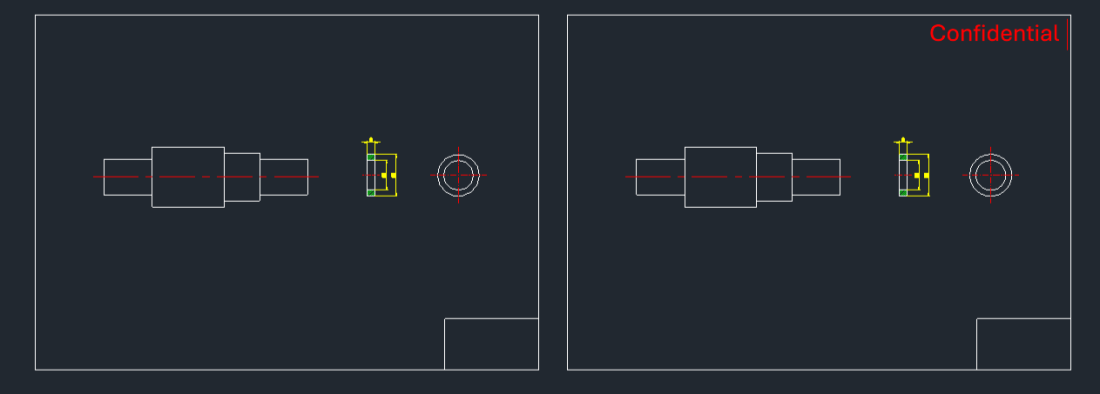
This tool is designed for batch processing multiple drawing files to replace their title blocks (or any specific block).

  • Scenario: Ideal for projects where you have thousands of drawings (1 drawing per file) with a block-based title block located at 0,0, and you need to replace it with a new title block from a different drawing file.

  • Automatic Scaling: The tool automatically adjusts the scale of the new block to match the scale of the original block being replaced (e.g., if the original was A2 or A1 size, the new A3 block will be scaled accordingly).

  • Batch Operation: It opens, modifies, saves, and closes each file in the target folder sequentially.


3/ Requirements :

  • Target Drawings: Must be located in C:\DWG.

  • New Block File: The replacement block file (e.g., TITLE_1.DWG, assumed to be A3 size at scale 1) must be in the support folder (e.g., C:\CADIAN\CADIAN 2025\SUPPORT).

  • DCL File: The autobk.dcl file (included in the download) must be copied to the C:\cadian folder.


4/ How to Use :

  1. Ensure all files are in their correct folders as described above.

  2. Type autobk in the command line and press Enter.

  3. A dialog box will appear with instructions.

  4. Click "OK" (or "확인") to start the batch process.

  5. The script will automatically process all drawings in the C:\DWG folder.


Added to cart.

VIEW CART

Please sign in first.

JOIN