Support

As evidenced by over 30 years of development history, trust-worthy Korean CAD, CADian!

Utility Archive · 2026.03.02
[Lisp #320] EFi : Non-Trimming Wire Fillet

Hi,

This is CADian.

We have prepared 400+ Lisp programs to aid your CAD experience, free of charge!

Full List of all CADian Lisps : [Full CADian Lisp List]

How to Install : [CADian Lisps Download & Install Guide]


====================================================


1/ Command :

  • EFi


2/ Description :
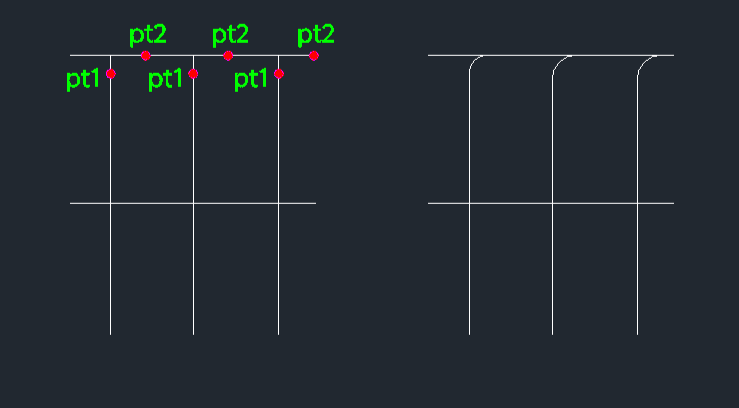
This tool is designed for electrical drawings (or similar schematic work) where you need to create a fillet (rounded corner) connection between lines without trimming the original lines.

  • Non-destructive Fillet: Creates an arc connecting two lines but keeps the original lines intact (unlike the standard FILLET command which usually trims them).

  • Directional Control: The direction of the fillet arc depends on which side you click relative to the base line.

  • Input: Requires the fillet radius, selecting the first line (e.g., top part of a vertical line), and then clicking a point to indicate the direction (e.g., to the right).


3/ How to Use :

  1. Type efi in the command line and press Enter.

  2. Enter the Fillet Radius.

  3. Select the First Line (e.g., click the upper part of a vertical line).

  4. Click a Direction Point (e.g., click to the right to curve right, or left to curve left).

  5. A fillet arc is drawn connecting in the specified direction, preserving the original geometry.


Added to cart.

VIEW CART

Please sign in first.

JOIN