Support

As evidenced by over 30 years of development history, trust-worthy Korean CAD, CADian!

Utility Archive · 2026.03.02
[Lisp #319] AH : Draw Vent Pattern

Hi,

This is CADian.

We have prepared 400+ Lisp programs to aid your CAD experience, free of charge!

Full List of all CADian Lisps : [Full CADian Lisp List]

How to Install : [CADian Lisps Download & Install Guide]


====================================================


1/ Command :

  • AH


2/ Description :
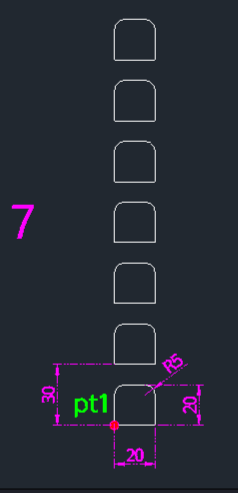
This tool draws an array of ventilation slots (air holes), often used in electrical enclosures or machinery panels.

  • Slot Generation: Creates elongated slots with rounded ends.

  • Array Function: Automatically copies the slots upwards to create a ventilation grille pattern.

  • Shape Adaptation: Depending on the quantity and dimensions, the shape representation might simplify (e.g., to a simple rectangle or semi-circle for large counts/small scales).

  • Input: Requires a start point, slot width, slot height, top fillet radius, total count (vertical array), and pitch (vertical distance between slots).


3/ How to Use :

  1. Type ah in the command line and press Enter.

  2. Click the Start Point (PT1).

  3. Enter the Slot Width (Horizontal dimension).

  4. Enter the Slot Height (Vertical dimension).

  5. Enter the Top Fillet Radius.

  6. Enter the Total Count of slots to copy upwards.

  7. Enter the Pitch Distance (Vertical spacing between slots, e.g., 30).

  8. The ventilation hole pattern is drawn.


Added to cart.

VIEW CART

Please sign in first.

JOIN