Support

As evidenced by over 30 years of development history, trust-worthy Korean CAD, CADian!

Utility Archive · 2026.03.02
[Lisp #317] CM : Draw Center Mark

Hi,

This is CADian.

We have prepared 400+ Lisp programs to aid your CAD experience, free of charge!

Full List of all CADian Lisps : [Full CADian Lisp List]

How to Install : [CADian Lisps Download & Install Guide]


====================================================


1/ Command :

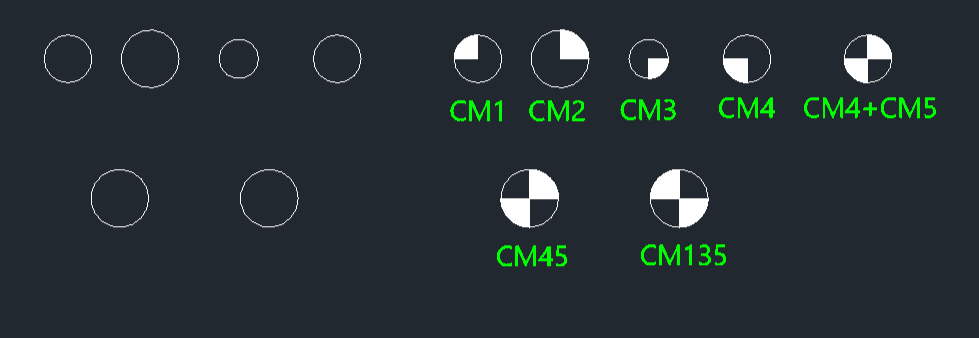
  • CM1 : Draw Center Mark Top Left

  • CM2 : Draw Center Mark Top Right

  • CM3 : Draw Center Mark Bottom Right

  • CM4 : Draw Center Mark Top Left

  • CM45 : Draw Center Mark Top Right, Bottom Left

  • CM135 : Draw Center Mark Top Left, Bottom Right


2/ Description :
This tool automatically draws various types of center marks on selected circles.

  • Variety: Provides commands for different center mark styles (e.g., standard crosses, rotated crosses at 45 or 135 degrees).

  • Combination: You can apply multiple commands to the same circle to create complex center marks (e.g., applying CM1 and CM3 creates a CM135 style).

  • Input: Simply type the desired command (e.g., CM45) and click on an existing circle.


3/ How to Use :

  1. Type the desired command (e.g., cm45) in the command line and press Enter.

  2. Select an existing Circle.

  3. The specified center mark is drawn on the circle.

    • Tip: To create a combined mark like a starburst, use cm1 then cm3 (or cm2 then cm4) on the same circle.


Added to cart.

VIEW CART

Please sign in first.

JOIN