Support

As evidenced by over 30 years of development history, trust-worthy Korean CAD, CADian!

Utility Archive · 2026.03.02
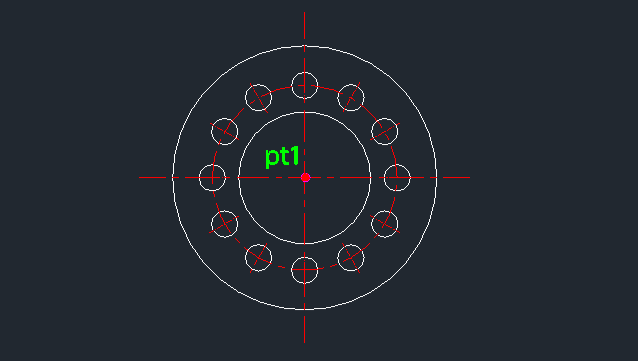
[Lisp #316] FSIDE : Draw Flange (Side View)

Hi,

This is CADian.

We have prepared 400+ Lisp programs to aid your CAD experience, free of charge!

Full List of all CADian Lisps : [Full CADian Lisp List]

How to Install : [CADian Lisps Download & Install Guide]


====================================================


1/ Command :

  • FSIDE


2/ Description :
This tool automatically draws the side view of a flange, including the bolt hole centerlines.

  • Efficient Drafting: Instead of manually drawing multiple concentric circles and calculating bolt hole positions, this command generates the entire side profile based on a few parameters.

  • Input: Requires the center point, outer diameter, inner diameter, pitch circle diameter (PCD) for bolt holes, bolt hole diameter, and the number of bolt holes.

  • Auto-Layer: Automatically creates the center layer if it doesn't exist.

  • Note: For the front view of a flange, the post suggests using the existing COVER command.


3/ How to Use :

  1. Type fside in the command line and press Enter.

  2. Click the Center Point for the flange.

  3. Enter the Outer Diameter.

  4. Enter the Inner Diameter.

  5. Enter the PCD (Pitch Circle Diameter) for the bolt holes (the diameter of the circle passing through the bolt hole centers).

  6. Enter the Bolt Hole Diameter.

  7. Enter the Number of Bolt Holes.

  8. The complete side view of the flange, including bolt holes and centerlines, is drawn.


Added to cart.

VIEW CART

Please sign in first.

JOIN