Support

As evidenced by over 30 years of development history, trust-worthy Korean CAD, CADian!

Utility Archive · 2026.03.02
[Lisp #311] LED : Insert LED Light

Hi,

This is CADian.

We have prepared 400+ Lisp programs to aid your CAD experience, free of charge!

Full List of all CADian Lisps : [Full CADian Lisp List]

How to Install : [CADian Lisps Download & Install Guide]


====================================================


1/ Command :

  • LED


2/ Description :
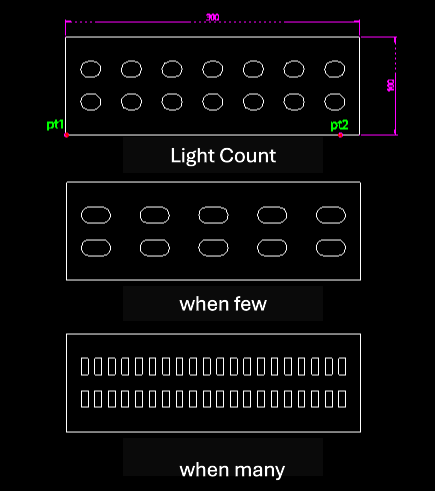
This tool automatically draws an array of LED lights within a specified rectangular area, typically for electrical or lighting plans.

  • Smart Layout: It arranges the lights (defaulting to two rows) based on the specified area dimensions and count.

  • Auto-Spacing: The left and right margins are automatically calculated to space the lights evenly.

  • Shape Variation: As the number of lights increases, the representation might change (e.g., to a square or semicircle, based on the description, though primarily it arrays the light symbol).

  • Input: Requires a start point, direction, width, height, and the total count of lights in the horizontal direction.


3/ How to Use :

  1. Type led in the command line and press Enter.

  2. Click the Start Point (PT1).

  3. Click the Direction Point (PT2).

  4. Enter the Horizontal Distance (Width of the area).

  5. Enter the Vertical Distance (Height of the area).

  6. Enter the Horizontal Light Count.

  7. The LED lights are drawn and arranged within the defined area.


Added to cart.

VIEW CART

Please sign in first.

JOIN