Support

As evidenced by over 30 years of development history, trust-worthy Korean CAD, CADian!

Utility Archive · 2026.03.02
[Lisp #310] RRA2: Draw Round Rect Array (2-Col)

Hi,

This is CADian.

We have prepared 400+ Lisp programs to aid your CAD experience, free of charge!

Full List of all CADian Lisps : [Full CADian Lisp List]

How to Install : [CADian Lisps Download & Install Guide]


====================================================


1/ Command :

  • RRA2


2/ Description :
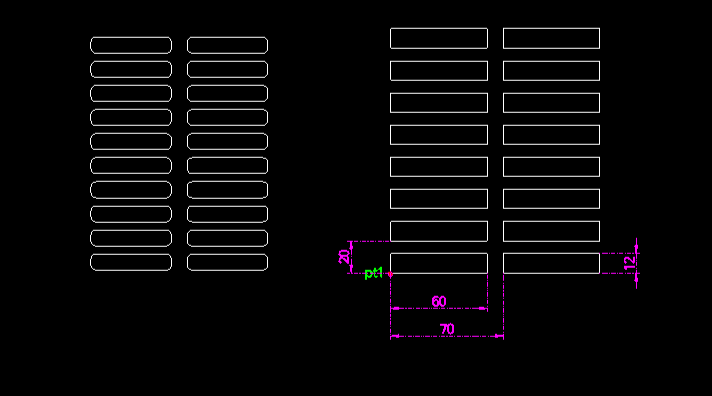
This tool creates a rounded rectangle and then arrays it in two vertical columns (or rows, depending on interpretation, but typically a 2-column layout).

  • Grid Array: Unlike RRA which creates a single linear array, RRA2 creates a dual-line array, useful for layouts requiring paired or double-row placement.

  • Input: Requires a start point, dimensions (width/height), corner radius, pitch distances for both Y (vertical spacing) and X (horizontal spacing between columns/rows) directions, and the total vertical count per column.


3/ How to Use :

  1. Type rra2 in the command line and press Enter.

  2. Click the Start Point (PT1).

  3. Enter the Width of the rectangle.

  4. Enter the Height of the rectangle.

  5. Enter the Corner Radius (0 for sharp corners).

  6. Enter the Vertical Pitch (Y-axis distance to next rectangle).

  7. Enter the Horizontal Pitch (X-axis distance to the next column).

  8. Enter the Total Vertical Count (number of rectangles per column).

  9. The 2-column array of rounded rectangles is generated.


Added to cart.

VIEW CART

Please sign in first.

JOIN