Support

As evidenced by over 30 years of development history, trust-worthy Korean CAD, CADian!

Utility Archive · 2026.03.02
[Lisp #306] 4CBRH : 4 Counterbores Horizontal to Rectangle

Hi,

This is CADian.

We have prepared 400+ Lisp programs to aid your CAD experience, free of charge!

Full List of all CADian Lisps : [Full CADian Lisp List]

How to Install : [CADian Lisps Download & Install Guide]


====================================================


1/ Command :

  • 4CBRH


2/ Description :
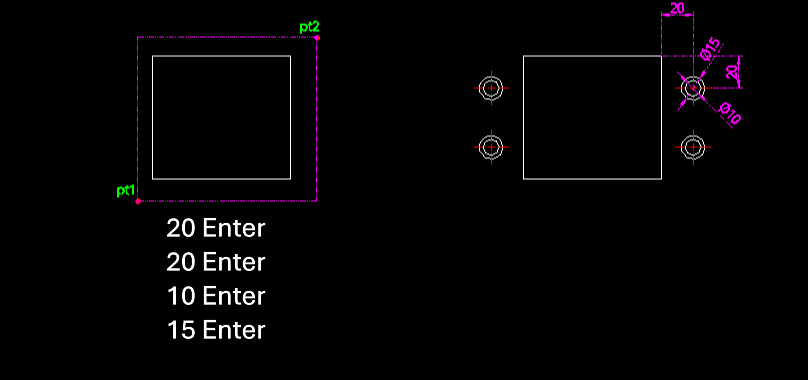
This tool automatically draws the top-down plan view of four counterbore holes symmetrically positioned inside a rectangle, similar to 4CBRV but with a horizontal orientation logic.

  • Layout: Generates concentric circles representing counterbore holes (bolt head + shaft clearance) at four corners relative to the rectangle.

  • Input: Requires the rectangle's two corner points, offsets from the corner to the hole center, and the diameters for the small (shaft) and large (head) circles.

  • Auto-Layer: Creates the center layer if it doesn't exist.


3/ How to Use :

  1. Type 4cbrh in the command line and press Enter.

  2. Click the First Corner Point (PT1) of the rectangle.

  3. Click the Second Corner Point (PT2).

  4. Enter the Horizontal Offset from the corner to the hole center.

  5. Enter the Vertical Offset from the corner to the hole center.

  6. Enter the Small Circle Diameter.

  7. Enter the Large Circle Diameter.

  8. Four counterbore plans (with center lines) are drawn at the specified locations inside the rectangle.


Added to cart.

VIEW CART

Please sign in first.

JOIN