Support

As evidenced by over 30 years of development history, trust-worthy Korean CAD, CADian!

Utility Archive · 2026.03.02
[Lisp #304] SEKS : Draw End Keyway

Hi,

This is CADian.

We have prepared 400+ Lisp programs to aid your CAD experience, free of charge!

Full List of all CADian Lisps : [Full CADian Lisp List]

How to Install : [CADian Lisps Download & Install Guide]


====================================================


1/ Command :

  • SEKS


2/ Description :
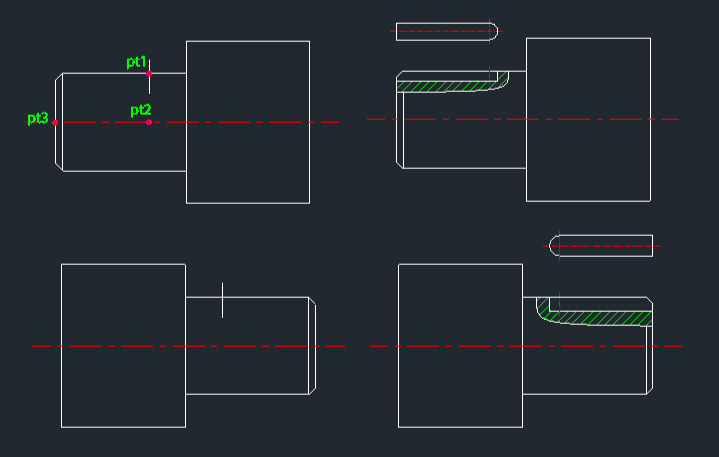
This tool automatically draws the section and plan views of a keyway at the end of a shaft.

  • Auto-View Generation: Creates both the cross-sectional view (showing the keyway depth) and the top-down plan view of the shaft end with the keyway.

  • Input: Requires three points to define the shaft end geometry (center, edge, etc.), the keyway radius (half-width), and the keyway depth.

  • Prerequisite: An internal vertical center line for the existing shaft must be present before running the command (this line is replaced by a center line layer during the process).

  • Layer Management: Automatically creates center and hatch layers if they are missing.


3/ How to Use :

  1. Ensure a vertical center line exists for the shaft.

  2. Type seks in the command line and press Enter.

  3. Click PT1, PT2, and PT3 as indicated in the example diagram (typically defining the shaft end boundary and position).

  4. Enter the Keyway Radius.

  5. Enter the Keyway Depth.

  6. The keyway section (with hatching) and the plan view are drawn automatically.


Added to cart.

VIEW CART

Please sign in first.

JOIN