Support

As evidenced by over 30 years of development history, trust-worthy Korean CAD, CADian!

Utility Archive · 2026.03.02
[Lisp #297] HANG : Draw Keyhole

Hi,

This is CADian.

We have prepared 400+ Lisp programs to aid your CAD experience, free of charge!

Full List of all CADian Lisps : [Full CADian Lisp List]

How to Install : [CADian Lisps Download & Install Guide]


====================================================


1/ Command :

  • HANG


2/ Description :
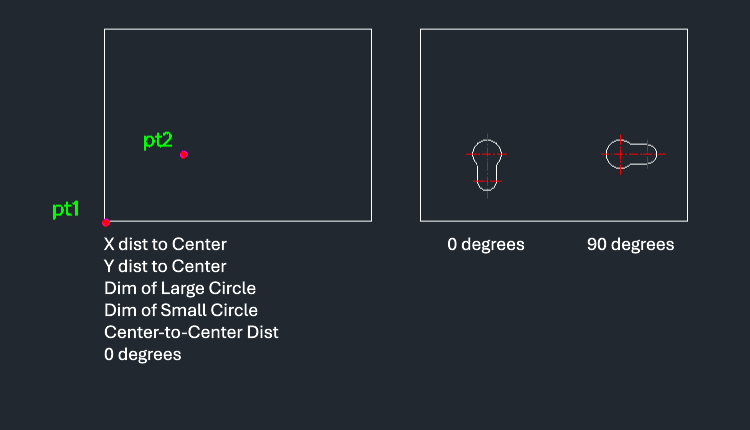
This tool draws a specific "hanger hole" shape, which typically consists of a larger circle connected to a smaller circle by a slot, often used for mounting or hanging objects.

  • Parametric Hole Creation: Allows defining the hole geometry by specifying the location and dimensions of the large and small circles and their connecting distance.

  • Input: Requires the corner point of a reference rectangle, an internal point, distances to the large circle center, diameters of both circles, the distance between centers, and the rotation angle.


3/ How to Use :

  1. Type hang in the command line and press Enter.

  2. Click the Corner Point (PT1) of the reference rectangle.

  3. Click an Internal Point (PT2).

  4. Enter the X Distance to the large circle's center.

  5. Enter the Y Distance to the large circle's center.

  6. Enter the Large Circle Diameter.

  7. Enter the Small Circle Diameter.

  8. Enter the Center-to-Center Distance.

  9. Enter (or click to define) the Rotation Angle.

  10. The hanger hole geometry is drawn. (Adding center lines completes the standard representation).


Added to cart.

VIEW CART

Please sign in first.

JOIN