Support

As evidenced by over 30 years of development history, trust-worthy Korean CAD, CADian!

Utility Archive · 2026.03.02
[Lisp #288] STCV : Draw Cover Plate (4 Slots)

Hi,

This is CADian.

We have prepared 400+ Lisp programs to aid your CAD experience, free of charge!

Full List of all CADian Lisps : [Full CADian Lisp List]

How to Install : [CADian Lisps Download & Install Guide]


====================================================


1/ Command :

  • STCV


2/ Description :
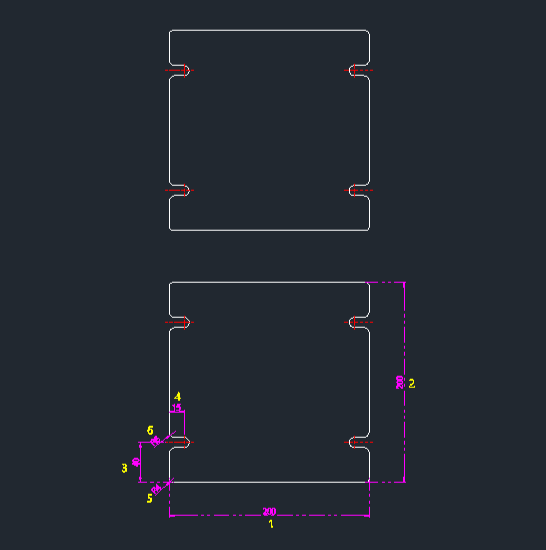
This tool automatically draws a rectangular steel cover plate with four double-ended rounded bolt holes (slots) placed near the corners.

  • Parametric Design: Allows you to define the overall size, hole positions, and fillet radii for both the cover corners and the bolt holes in a single operation.

  • Input: Requires a base point (bottom-left), overall width and height, vertical and horizontal offsets for the holes, and fillet radii for the outer corners and the holes.


3/ How to Use :

  1. Type stcv in the command line and press Enter.

  2. Click the Bottom-Left Point (PT1).

  3. Enter the Total Width.

  4. Enter the Total Height.

  5. Enter the Vertical Offset (distance from bottom edge to hole center).

  6. Enter the Horizontal Offset (distance from left edge to hole center).

  7. Enter the Outer Corner Radius (Fillet radius for the cover plate).

  8. Enter the Hole Fillet Radius (Radius for the rounded ends of the bolt holes).

  9. The complete steel cover with 4 bolt holes is drawn.


Added to cart.

VIEW CART

Please sign in first.

JOIN